

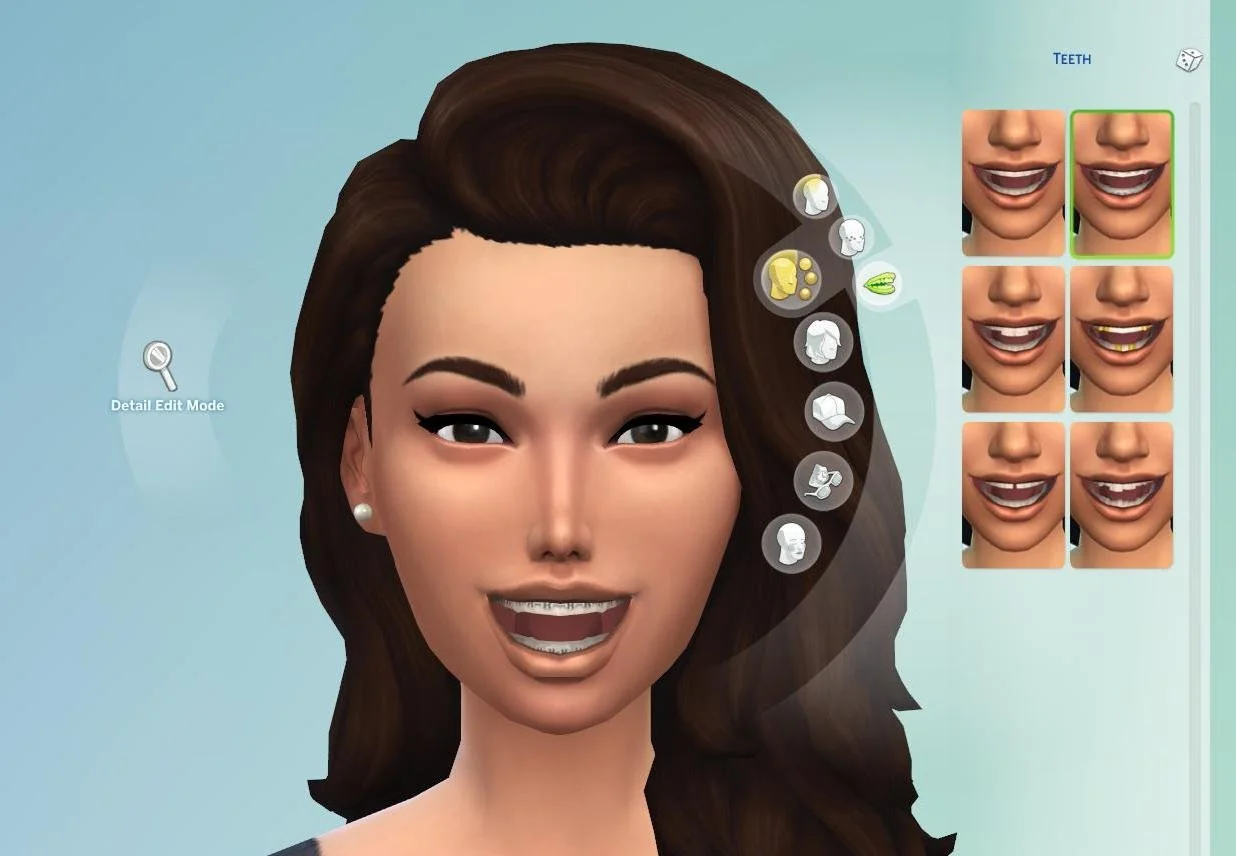
In the world of The Sims 4, custom appearance options allow players to craft characters with endless diversity — but nothing adds realism quite like a properly placed, subtle smile transformation. That’s why Sims 4 braces are becoming a go-to feature for players aiming for authenticity, whether you’re role-playing everyday life or building dramatic character stories. In this updated guide, we’ll walk you through everything you need to know about using braces in The Sims 4 — from finding the right mod to styling, troubleshooting, and making your Sims’ smiles shine like never before.
What Are Sims 4 Braces?
Sims 4 braces refer to custom-content (CC) modifications that simulate orthodontic braces for your Sims’ teeth — a detail not offered in the official base game. These mods let you add metal brackets, ceramic braces, colored bands, or even virtually invisible braces to a Sim’s mouth, giving them a more lifelike dental appearance. In short: braces are a cosmetic enhancement that adds realism and personality to your Sims’ smile, and can significantly affect how they look in thumbnails, portraits, and everyday gameplay.
Although the base game lacks braces, modders have filled this gap by crafting packages that plug directly into Create‑A‑Sim (CAS), allowing you to customize dental details with surprising flexibility and style.
Why Choose Sims 4 Braces for Your Sim?
Using Sims 4 braces can benefit your gameplay and storytelling in several ways:
-
Enhanced Realism: Many players create teenage or adult Sims who would realistically be undergoing orthodontic treatment. Braces add that touch of authenticity — no more perfect teeth for every Sim!
-
Deeper Characterization: Braces can reflect a Sim’s background or journey. A shy teenager might get braces as part of a growing-up storyline, or an adult might get them for self-improvement. It helps add depth and realism to your narrative.
-
Visual Variety: With braces, you avoid cookie-cutter perfection. Each Sim becomes more unique — whether they have bright metal, subtle ceramic, or fun colored bands.
-
Creative Freedom: Mods allow for subtle customization — different wire colors, band shades, or even braces styles fit for discreet or playful sims. Great for portraits, stories, and screenshots.
If you like making Sims that feel real — with flaws, quirks, and life — braces are a wonderful choice.
How to Install Sims 4 Braces — Step‑by‑Step
Because braces aren’t part of the base game, you’ll need to install CC. Here’s a basic roadmap to get things working:
-
Choose a Reputable Sims CC Source
Look for well-known community hubs that host Sims mods and custom content. Popular resources tend to keep their files updated and free of malicious code. -
Download the Braces Mod Package
Once you find a mod labeled for “Sims 4 braces,” download the.package(or similar) file. Some mods offer multiple variations — from metal braces to ceramic or colored band styles. Download everything you like. -
Enable Mods and CC in Game Settings
Launch The Sims 4 → go to Game Options → Other → and make sure “Enable Custom Content and Mods” and “Script Mods Allowed” (if needed) are checked. Restart the game afterward. -
Place the Mod Files in the Mods Folder
Copy the downloaded files into your Sims 4Modsfolder (usually located in Documents → Electronic Arts → The Sims 4 → Mods). -
Test in Create‑A‑Sim (CAS)
Open CAS and create a new Sim (or edit an existing one). Under the accessories or mouth/teeth section, you should now see braces options. Choose your desired style and adjust color, band shade, or size if the mod allows.
With these steps, your game will now support braces — and your Sims can walk around with dental realism in just minutes.
Popular Types of Sims 4 Braces Mods
Here’s a breakdown of common braces styles players use — each with its own vibe and aesthetic:
Traditional Metal Braces
-
Classic silver brackets and wires.
-
Perfect for teenage Sims or Sims just starting orthodontic treatment.
-
Offers the most “real-world” look and works well in everyday outfits or school-age stories.
Ceramic or Tooth‑Colored Braces
-
Less conspicuous than metal.
-
Great for adult Sims, professional settings, or characters who want subtle dental adjustments without flashy metal.
-
Provides realism if you want braces to look like orthodontic treatment under way, rather than a fashion statement.
Colored Bands or Fun Braces
-
Some mods allow colored rubber bands — red, blue, pink, even patterns.
-
Adds personality — maybe a rebellious teen, a creative soul, or just someone who loves bright accessories.
-
Perfect for storytelling or stylized gameplay (e.g. themed parties, school spirit, or holiday fun).
Invisible / Simulated Lingual Braces (Mod‑Dependent)
-
Designed to look more discreet, often blending into the teeth or placed behind them (depending on mod capabilities).
-
Offers a modern alternative — good for adult Sims who want braces with less obvious visibility.
-
Great for more subtle, realistic character customization.
Choosing the right style depends on your Sim’s age, personality, and the story you want to tell.
Tips for Styling Sims with Braces
If you want your Sims’ braces to look natural and part of their personality — not like a random addon — these tips help:
-
Think About Age and Background: Braces are most believable for teens and young adults. An adult Sim can have braces, but subtle ceramic or hidden braces often look more convincing.
-
Match Color to Personality or Mood: Bright band colors can reflect bold, expressive Sims. Neutral or tooth-colored braces suit sophisticated or professional Sims.
-
Combine with Haircuts and Accessories: A shy teen with braces + messy hair + casual clothes sells an awkward adolescent vibe. An adult with braces + slim glasses + a clean haircut can look like someone upgrading their look — realism at its finest.
-
Use Expressions & Poses: Some statements or storytelling screenshots — smiling, laughing, talking — look more natural when braces align correctly in CAS. Test expressions before finalizing.
-
Be Mindful of Mod Conflicts: If you use multiple face / tooth / accessories mods, adjust their load order. Some mods might override braces or deform teeth — always backup your saves before heavy modding.
Troubleshooting Common Issues with Sims 4 Braces
Even the best mods can run into hiccups. Here are common problems and how to fix them:
Braces Don’t Appear After Installation
-
Double-check that you placed the
.packagefiles in theModsfolder — not a subfolder. -
Make sure the game options allow “Custom Content and Mods.”
-
Restart the game to apply changes.
Braces Appear Misaligned or Distorted
-
Try resizing or repositioning in CAS if the mod allows.
-
If issues persist, check if the mod is compatible with your game version or conflicts with other mods. Remove conflicting mods and re-add braces mod.
Game Crashes or Errors After Adding Braces Mod
-
Remove the braces mod to confirm if the issue stems from it.
-
Update to the latest version of the mod — sometimes older mods aren’t compatible with the newest game patches.
-
Avoid using multiple mods that edit the mouth/teeth at once; pick the most stable mod for braces and disable others.
Braces Look Unnatural in Poses/Screenshots
-
Use CAS preview and facial expressions to test how braces look when smiling, talking, or emoting.
-
Adjust brightness or contrast in screenshots — metal braces can reflect light awkwardly, making them more noticeable than desired.
Why Sims 4 Braces Matter for Storytelling & Creativity
In creative gameplay or storytelling — especially in legacy challenges, family stories, or school-themed builds — Sims 4 braces can play a surprisingly meaningful role. They offer realism that sets apart your Sims from cartoonish perfection. Here’s how braces can enhance storytelling:
-
Character Development: A teen getting braces could be part of a coming-of-age story — awkward, self-conscious, then growing confident as those braces come off.
-
Realistic Family Dynamics: Siblings with different braces colors or styles — or even different braces‑time durations — can showcase personality differences.
-
Visual Symbolism: Braces can symbolize change, growth, vulnerability, or transformation. In a story where a Sim is rebuilding life or changing habits, braces can subtly signal that something is evolving.
-
Community Builds and Challenges: For players who share screenshots online, braces add depth and realism to Sims — making them stand out in screenshots, stories, or social media showcases.
In short: braces aren’t just dental accessories — they’re storytelling tools.
Conclusion
Braces may seem like a small detail — but with Sims 4 braces, that small detail can transform the realism and depth of your Sims’ lives. Whether you’re creating a shy teenager experiencing brace‑life for the first time, an adult seeking subtle orthodontic treatment, or a bold character flaunting colorful bands, braces help make your Sims feel more like real people. With straightforward installation, a wide range of creative styling options, and meaningful storytelling potential, braces are a powerful tool for any dedicated Sims player. Add that extra layer of realism — and watch your Sims’ smiles come alive.
Frequently Asked Questions (FAQs) About Sims 4 Braces
Q1: Do I need any special tools or software to install Sims 4 braces?
A1: No special tools are needed — just the base game installed, a working Mods folder, and the braces mod’s .package files. Enable “Custom Content and Mods” in game settings and you’re all set.
Q2: Are Sims 4 braces purely cosmetic, or do they impact gameplay?
A2: Braces are purely cosmetic. They don’t affect a Sim’s mood, skills, relationships, or career. They simply change how your Sim looks.
Q3: Can adult Sims wear braces, or are they only for teenagers?
A3: Adult Sims absolutely can wear braces — especially ceramic or subtle styles. It depends on the mod you choose.
Q4: Will braces stay on permanently, or can I remove them later?
A4: Most braces mods allow you to add or remove braces in CAS at any time. You can give a Sim braces for a few in‑game years, then remove them to simulate treatment completion.
Q5: What should I do if braces appear distorted or cause graphical glitches?
A5: First, try reloading CAS or repositioning the braces if the mod allows. If the issue persists, check for mod compatibility with your game version and disable any conflicting mods that affect the mouth/teeth area.